License Keys
A Calibration Guard license key is a base64-encoded string that tells the guard daemon the dates between which calibration changes are permitted. Without a valid key, the guard reverts all changes to the protected INI sections.
Key types
| Type | Description | Use case |
|---|---|---|
| Date-range | Valid from a start date to an end date | Standard on-site calibration window |
| Permanent | No expiration — valid indefinitely | Special authorization for long-term or internal use |
Generating a key
Keys are generated using the License Key Server — a web UI hosted on EC2 accessible to ViciVision staff.
Alternatively, keys can be generated from the command line on any machine that has the calibration-guard source:
node key-gen.js --from 20260301 --to 20260401
node key-gen.js --permanent
Both commands print the base64 key string to stdout. Copy it and send it to the customer (email, secure message, etc.).
Date format
All dates use YYYYMMDD format — e.g., 20260301 for March 1, 2026.
Installing a key on the customer machine
The key must be written to the Windows Registry under HKLM\SOFTWARE\ViciCalibGuard. This requires Administrator privileges.
Via VIA Onboard (recommended)
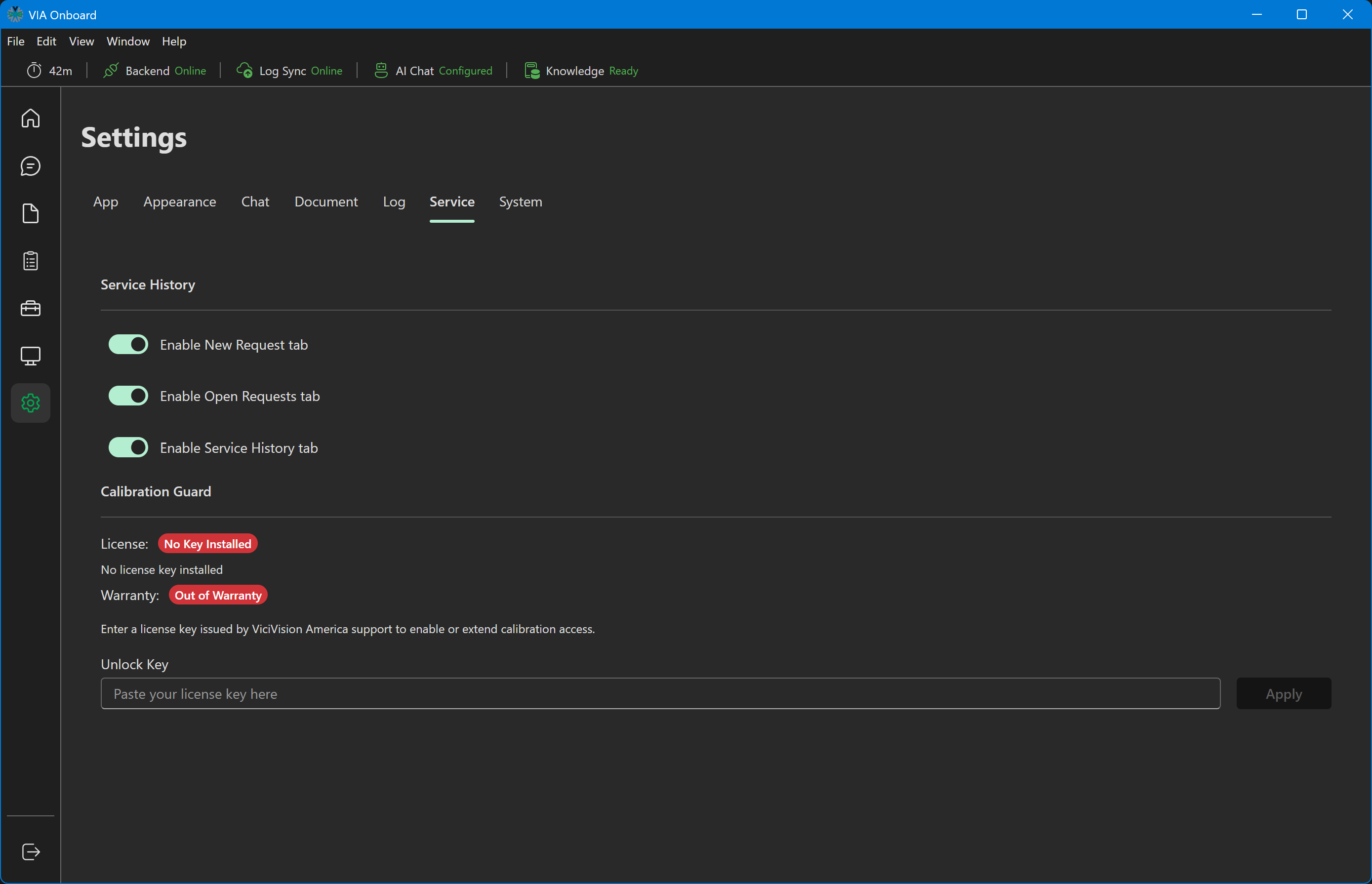
In VIA Onboard, go to Settings → Service, paste the key into the Unlock Key field under Calibration Guard, and click Apply. VIA Onboard handles the Registry write with appropriate elevation.
Settings → Service — Unlock Key
Via command line
On the customer machine, open a terminal as Administrator and run:
node install-key.js <key>
Or using the compiled guard executable's install helper (if standalone):
guard.exe --install-key <key>
Checking key status
node install-key.js --status
Output:
License key found in registry.
Status: VALID
Valid from: 20260301
Valid to:   20260401
Days remaining: 18
Or if expired:
License key found in registry.
Status: EXPIRED
Valid from: 20260101
Valid to:   20260201
Expired 28 days ago.
Removing a key
To lock calibration immediately (removes the key from the Registry):
node install-key.js --remove
After removal, the guard will revert any further calibration changes using the most recent backup.
Key encoding
The key encodes the validity window in plain text (VALID_FROM=YYYYMMDD;VALID_TO=YYYYMMDD), applies a cyclic XOR with a hardcoded secret, and base64-encodes the result. The same secret is used in both key-gen.js (generation) and guard.js (validation).
Permanent keys encode PERMANENT_UNLOCK=YYYYMMDD instead. The date stamps when the key was issued, but the guard treats this type as always valid regardless of today's date.
Changing the secret invalidates all existing keys
The secret (ViciCalibGuard2024) is defined in src/license.js on both the guard side and in license-server/server.js. If you change it, all previously issued keys will be rejected. Only change it if you are intentionally revoking all outstanding keys (e.g., after a security incident).
Key lifecycle
ViciVision staff
  └─ Opens License Key Server
  └─ Chooses date range (e.g., 2026-03-01 to 2026-04-01)
  └─ Clicks "Generate Key"
  └─ Copies base64 key string
       └─ Sends to customer / technician

Customer machine (Administrator)
  └─ Opens VIA Onboard → Settings → Service
  └─ Pastes key
  └─ Clicks "Install Key"
       └─ Key written to HKLM\SOFTWARE\ViciCalibGuard\LicenseKey

Calibration Guard daemon
  └─ Reads key from Registry on next file change (or interval tick)
  └─ Decodes and validates key
  └─ If valid → allows changes, updates backup
  └─ If expired → reverts changes, shows dialog, logs reason