Analytics Dashboard
The Analytics Dashboard is a Streamlit-based web application for fleet-wide log analysis and per-machine diagnostics. It runs on EC2 and is accessible from any browser — no installation required.
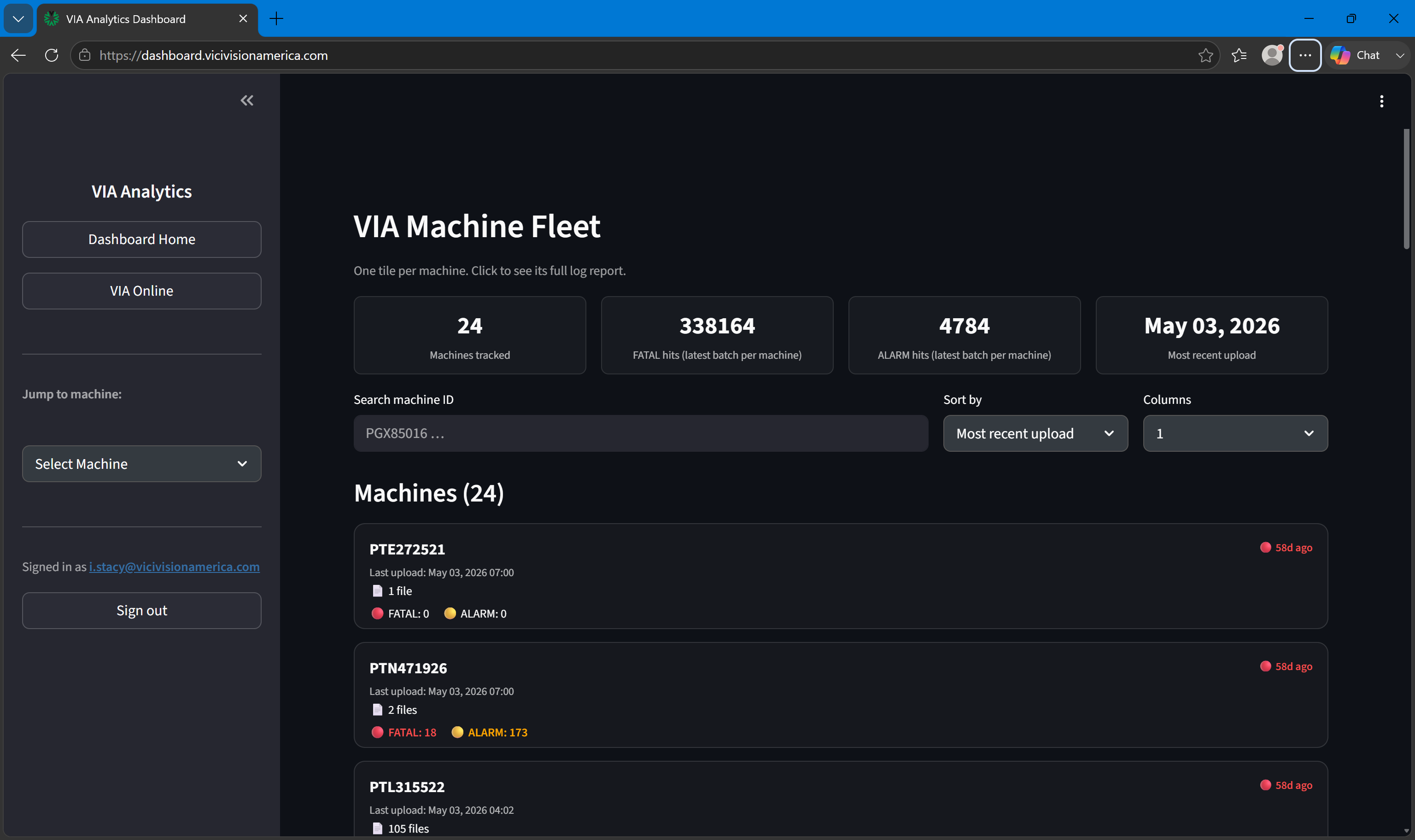
Analytics Dashboard — fleet view
What it does
The Analytics Dashboard connects to the same PostgreSQL database that receives log uploads from VIA Onboard machines. It provides:
- Fleet overview — one tile per machine with upload freshness, FATAL count, and ALARM count
- Machine reports — per-machine drilldown with Plotly charts of error trends, batch history, and log detail
Who uses it
The Analytics Dashboard is primarily used by:
- Technicians reviewing machine health before or after a service visit
- Managers monitoring fleet-wide error trends
- ViciVision support staff investigating reported issues using real machine data
Authentication
The dashboard uses password-based authentication. Contact your administrator for credentials. A single Log out button is available in the sidebar.
Relationship to VIA Online
The Analytics Dashboard and VIA Online are independent applications that share a common data source. The Analytics Dashboard provides deeper per-machine Plotly charts and direct access to raw log data. VIA Online provides a more polished interface with AI chat, document management, and user organization features.